Start saving on everyday purchases

Budget Direct customers can shop with our partners and save effortlessly with Budget Direct Shopping Rewards~. Get access to discounted Retailer Gift Cards, and Cashback Credit offers, available in the Budget Direct App#. Simply retain a policy to be eligible.

Scan to download

QR code to download the Budget Direct App

~Budget Direct Shopping Rewards Terms and Conditions apply.

#Budget Direct App Terms of Use apply.

Explore a great range of discounts open to Budget Direct Customers~

Shopping Rewards can provide Budget Direct customers with access to discounted Retailer Gift Cards, as well as Cashback Credit offers, across a range of categories including groceries, fashion, travel and entertainment~.

It's FREE for customers with an active policy. Simply sign up for Budget Direct Shopping Rewards~.

Note: For joint policies or memberships, the primary policy holder is eligible for Shopping Rewards~.

Cashback Credit Offers

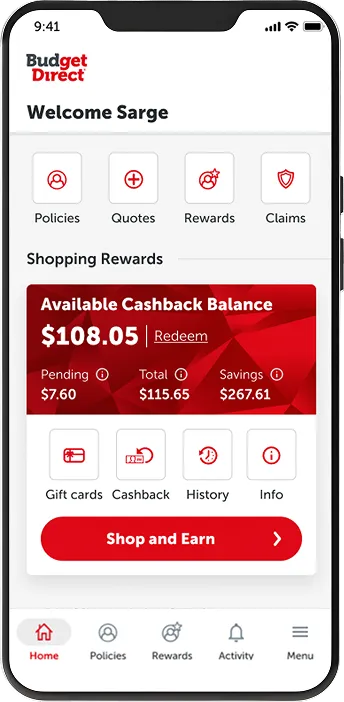
Earn Cashback Credits on eligible purchases made via Shopping Rewards~. You can then redeem your Available Cashback Balance for a Digital Gift Card or a Digital Prepaid Mastercard. Minimum redemption values apply~.

Learn more

Shopping Rewards

Discounted Gift Cards

Enjoy discounts on gift cards with selected retailers across a range of categories~. Choose from groceries, fashion, electronics and more. Simply purchase the discounted Retailer Gift Cards and use them to pay for your everyday purchases (note: credit card fees apply when purchasing and Cashback Credit is not available when purchasing discounted Retailer Gift Cards)~.

Learn more

Shopping Rewards

Earn Cashback Credits on your purchase~

As a Budget Direct customer, you can earn Cashback Credits on Eligible Purchases across a range of categories, including fashion, travel and e-commerce via Shopping Rewards~. You can redeem your Available Cashback Balance for a Digital Prepaid Mastercard or a Digital Gift Card once you reach the minimum redemption value in your Available Cashback Balance. You could be saving hundreds of dollars a year.

Flight Centre Petstock Myer Priceline Sheridan Cotton On THE ICONIC Appliances Online

Cashback Credit offer rates often change to bring you the very best savings~. To view the current Cashback Credit offer rates, plus the full list of participating retailers available, open the Budget Direct App.

How to earn Cashback Credits

1

Log in

Download the Budget Direct App and log in using your Date of Birth and Mobile Number as listed on your policy. Follow the prompts to complete the verification process and to agree to the Shopping Rewards Terms and Conditions~.

2

Start shopping

Browse the Cashback Credit offers available within Shopping Rewards. Click a retailer and follow the prompts to earn Cashback Credits on Eligible Purchases made via Shopping Rewards~.

3

Earn Cashback Credits

Pending Credits on approved purchases will appear as Available Cashback Balance within 120 days and can be redeemed for either a Digital Gift Card or a Digital Prepaid Mastercard~.

Frequently Asked Questions

~Note minimum Available Cashback Balances apply to redeem: $20 for a Digital Gift Card and $22 for a Digital Prepaid Mastercard. A $2 transaction fee applies for all Digital Prepaid Mastercard redemptions. See here for the full Shopping Rewards Terms and Conditions.

Access discounted Gift Cards from major retailers~

Budget Direct customers with an active policy can access discounted Retailer Gift Cards from a wide range of categories, including groceries, fashion, electronics and more~. Simply purchase the discounted Retailer Gift Cards and use them to pay for your everyday purchases (note: credit card fees apply when purchasing and Cashback Credit is not available when purchasing discounted Retailer Gift Cards)~. These gift cards can also be a thoughtful surprise for someone special.

BIG W EB Games H&M The Good Guys Woolworths JB Hi-Fi BCF Rebel

Digital Gift Card discounts often change to bring you the very best savings~. Note that a credit card fee applies to your purchase. To view the current discounts, plus the full list of participating retailers available, open the Budget Direct App.

How to purchase a discounted Retailer Gift Card

Simply open up the Budget Direct App# and agree to the Shopping Rewards Terms and Conditions (if you haven't already).

Select the 'Gift Cards' menu and choose from a wide range of retailers.

Follow the prompts to purchase the discounted Retailer Gift Cards. Your Digital Gift Card will be sent via email and SMS.

You can use these to pay for your next purchases or gift them to someone special. You'll be surprised how quickly the savings add up!

Download the Budget Direct App#

How to redeem

Get the Budget Direct App# Now

Download the Budget Direct App# to access Budget Direct Shopping Rewards. It's FREE to sign up for all Budget Direct customers with an active policy.

Note: For joint policies or memberships, the primary policy holder is eligible for Shopping Rewards~.

Using the Budget Direct App#

  1. Download the Budget Direct App# on your mobile device.
  2. Log in using your Date of Birth and Mobile Number recorded against your policy.
  3. Follow the prompts to complete the verification process.
  4. Agree to the Shopping Rewards Terms and Conditions~. You're all set!

~Budget Direct Shopping Rewards Terms and Conditions apply.

#Budget Direct App Terms of Use apply.

#Budget Direct App Terms of Use apply.

~Budget Direct Shopping Rewards Terms and Conditions

Budget Direct Shopping Rewards (Shopping Rewards) is only available to Eligible Customers who hold a current Budget Direct branded product as promoted by Auto & General Services Pty Ltd (AGS). No other brands promoted by AGS are eligible. Participants must register a valid email, first and last name, date of birth, postcode and mobile number, be the primary policy holder and be 18 years or over at policy purchase. Shopping Rewards must be activated by downloading the Budget Direct App, accepting the Terms & Conditions and clicking to activate rewards to confirm participation. You may cease participation at any time. Gift Card Discounts and Cashback Credits are only available on featured Rewards Retailers. Cashback Credits are only awarded on approved eligible purchases. Eligible Rewards Retailers Terms & Conditions may apply and will prevail over the Shopping Rewards Terms and Conditions. See Shopping Rewards Terms and Conditions for full details.

Frequently Asked Questions

Getting Started

How do I join Budget Direct Shopping Rewards?

If you hold an active Budget Direct insurance policy or membership with us as a primary policy holder, and have provided us with First Name, Last Name, Date of Birth, Mobile, Email and Postcode, you will be eligible to join Budget Direct Shopping Rewards. Details of how to join can be found within your Online Policy Manager, Budget Direct App and may also have been sent to you via email.

Please allow up to 96 hours from the time you first purchased the policy or membership for your access to be enabled with Shopping Rewards.

You’ll need to download the Budget Direct App in order to use Budget Direct Shopping Rewards. Once downloaded, activate your Budget Direct Shopping Rewards by selecting ‘I want Shopping Rewards’, tick to accept the Terms and Conditions and applicable Privacy Notices, and click the ‘Activate Rewards’ button to confirm.

What do I get once I join Budget Direct Shopping Rewards?

After joining Budget Direct Shopping Rewards, you can access discounts on gift card purchases and Cashback Credit offers by shopping at participating retailers online through the Shopping Rewards program. You can redeem your Cashback Credits for a Digital Gift Card or a Digital Prepaid Mastercard.

I don’t own a smartphone - can I still access Budget Direct Shopping Rewards?

Budget Direct Shopping Rewards is exclusively available through the Budget Direct App. To access the benefits and earn Cashback Credit, you will need to download and use the mobile App on a compatible smartphone or tablet.

Discounted Retailer Gift Cards

What are discounted Retailer Gift Cards?

Discounted Retailer Gift Cards are digital gift cards available at a lower price than their loaded value. You can shop from our range of discounted Retailer Gift Cards and purchase them for less than their full spend amount. This means you save upfront, while still receiving the full value to use in-store or online.

How can I use my discounted Retailer Gift Cards?

You can buy discounted Retailer Gift Cards through the Budget Direct App and use them in accordance with the individual gift card’s terms and conditions.

Once you purchase a discounted Retailer Gift Card, it will be emailed to you or a recipient you can nominate, within 48 hours and will then be available for you or the recipient to use in store or online. The email will be sent to the email address nominated in the purchase process and will appear from our gift card retailer - eGift IT, with a subject line of ‘You have received a digital gift card!’. It will also include full instructions on how to redeem your discounted Retailer Gift Card. Each Retailer Gift Card will have its own expiration period - refer to your gift card for these details.

You will also receive an Order Summary via email. A copy of your voucher will also be sent via SMS to the mobile number provided in the purchase process. The SMS will appear to be sent by the name and mobile number provided in the purchase process. It is your responsibility to use the discounted Retailer Gift Card prior to the expiration period.

I purchased a discounted Retailer Gift Card and received an Order Summary, but I haven’t received my Retailer Gift Card - what now?

If you or your nominated recipient have not received your discounted Retailer Gift Card via email within 48 hours, you can track it using the Order Tracking feature by entering the order number found on your Order Summary.

Enter the order number - found on your Order Summary email - and the Sender’s email address - which is the one used to order the gift card - in the respective fields. Click on the blue button TRACK OR RESEND. You will then be able to see the order details and the delivery status of the order. Then select Send Gift Card. The gift card will be sent to the recipient.

This ensures the gift card can still be delivered even if the original email was missed or filtered.

If your discounted Retailer Gift Card has not arrived within 48 hours of completing this step, please contact us using the ‘Contact Shopping Rewards Support’ form within the Budget Direct App.

This form can be found under ‘Help & Support’ in the Shopping Rewards section. Please fill out the contact form with the relevant details. The support team will then investigate the issue for you and be in touch within one business day.

I purchased a discounted Retailer Gift Card but I haven’t received any email or SMS - what now?

If your discounted Retailer Gift Card has not arrived within 48 hours, please contact us using the ‘Contact Shopping Rewards Support’ form within the Budget Direct App.

This form can be found under ‘Help & Support’ in the Shopping Rewards section. Please fill out the contact form with the relevant details. The support team will then investigate the issue for you and be in touch within one business day.

Is it possible to update/edit the recipient’s email address after purchasing a discounted Retailer Gift Card?

You can update the recipient’s email address using the Order Tracking feature. Enter your order number and sender email address, then select Edit to amend the recipient details. Once updated, click Save, then Send Gift Card to resend it to the corrected email address.

Why is my discounted Retailer Gift Card order cancelled?

Please note that only Australian-issued credit cards are accepted for discounted Retailer Gift Card purchases. Orders placed using overseas credit cards may be automatically cancelled and refunded.

To avoid this, please ensure a valid Australian credit card is used at checkout. This requirement is also outlined during the purchase process and in the order confirmation email.

Earning Cashback Credits

What is Cashback Credit and how can I earn it?

Cashback Credit is an incentive where you receive a percentage of your purchase amount back. It is credited to your Shopping Rewards account when you make an eligible purchase through a participating retailer’s site via the Shopping Rewards program. Once you make an eligible purchase, the Cashback Credit will appear in your account in two stages:

  • Pending: Where the Cashback Credit has been tracked but not yet confirmed by the participating retailer. It may take up to 7 days to appear as Pending in your account. Please note that amounts shown as Pending are not available for redemption.
  • Approved: Where the Cashback Credit has been confirmed and settled by the participating retailer. It may take up to 120 days to be Approved, depending on the participating retailer. The Approved Cashback Credits will be shown as Available Cashback Balance and available for redemption once it reaches and exceeds the minimum redemption value.

Why do I have to wait so long for my Cashback Credits to move from Pending to Available Cashback Balance?

To ensure that Cashback Credit is accurately applied to your account, retailers set a review period of up to 120 days to carefully check and validate purchases.

This timeframe usually includes any post-return/cancellation periods, as well as time allowed for the retailer to accurately validate the purchase and corresponding Cashback Credits.

What can I do to make sure I receive Cashback Credit for my eligible purchase?

Here are some tips to help ensure you receive Cashback Credit for your eligible purchases:

  1. Always begin your shopping journey through the Shopping Rewards program using the Budget Direct App. To ensure your Cashback Credit or discount is applied correctly, only add items to your cart after you have logged in and clicked through to the retailer from Shopping Rewards within the App.
  2. Do not open other websites, links or web browsers after clicking through from the Shopping Rewards program.
  3. Make sure that your order is completed within 2 hours of clicking through to the retailer from the Shopping Rewards program.
  4. Do not click on advertising banners or links on the retailer’s website when shopping.
  5. Disable any Ad Blocker software as this may affect the ability to track Cashback Credit.
  6. Always make sure you know and are adhering to the individual offer terms and conditions before you shop. These can be found on each of the offer pages.

Why didn’t I receive Cashback Credit for my purchase?

There are several possible reasons your Cashback Credit didn’t track:

  • You didn’t access the retailer’s site directly through the Shopping Rewards program. For example, you visited a second retailer’s website from the first retailer’s site.
  • You didn’t comply with the retailer’s specific terms and conditions.
  • The Cashback Credit tracking failed due to third-party system issues.
  • The retailer hasn’t yet confirmed the transaction
  • You used a Virtual Private Network (VPN).

If tracking fails due to the above reasons, Cashback Credit may not be awarded.

Are Cashback Credit offers valid with other discounts or payment methods?

In most instances, yes, however each retailer sets its own rules regarding Cashback Credit eligibility in combination with other offers or payment methods. Always review the retailer’s Terms and Conditions before purchasing.

What happens if I return an item or cancel a service?

If you return a product or cancel a subscription before fulfilling the retailer’s terms, your Cashback Credit will be voided and removed from your account.

Are there any limits to what I can earn Cashback Credit for?

Yes, there are some instances where you will not be eligible to earn Cashback Credit. These include on:

  • Orders paid with store credits
  • Purchases where a gift card is used as payment
  • Purchases where you visit other websites after clicking through Shopping Rewards tab in the Budget Direct App
  • Orders placed outside of 2 hours after clicking on the Shopping Rewards program in the Budget Direct App.
  • Orders not fully completed through Shopping Rewards in the Budget Direct App
  • Purchases of gift cards, unless otherwise stated in the offer terms
  • Any purchase where fraudulent activity is detected, or
  • When unauthorised discount codes are used or
  • If an order has been cancelled, changed or refunded

Retailers’ T&Cs determine if taxes and/or delivery fees are included or excluded in the Cashback Credit calculation. See Cashback Offer Terms within the Budget Direct App for full details.

My Cashback Credit was not approved - what now?

Please note that there are restrictions on earning Cashback Credit, as covered in our Terms and Conditions (Please refer to question ‘Are there any limits to what I can earn Cashback Credit for?’).

If you believe your Cashback Credit has not been applied correctly, please log into the App and navigate to the ‘History’ tab within the Shopping Rewards program. Look up the specific transaction, tap ‘Enquire’ and fill out the contact form with the relevant details. The support team will then investigate the issue for you and be in touch within one business day.

I’m experiencing an issue on the retailer’s website. What should I do?

If you have any issues making payment or the retailer website times out, you should restart your shopping journey through Shopping Rewards in the Budget Direct App. For specific enquiries related to the retailer, please contact them directly.

Redeeming Cashback Credits

How can I redeem my Approved Cashback Credit?

Once your Cashback Credit is approved and your Available Cashback Balance reaches and exceeds the minimum redemption value (Please refer to question ‘What is the minimum redemption value I need to redeem my Cashback Credit?’), you can redeem it for a Digital Gift Card or a Digital Prepaid Mastercard. Please note that a $2 transaction fee will apply for Digital Prepaid Mastercard redemptions. This fee is a standard fee applied to cover processing costs associated with the Digital Prepaid Mastercard.

Your selected Digital Gift Card or Digital Prepaid Mastercard will be sent via text message to your nominated mobile number. Delivery is generally within 48 hours but can vary. Please ensure you check your SMS inbox, including any filtered or blocked messages. The text message contains a link, in which you or the nominated recipient will be prompted to download the The Card Network (TCN) App (if not already installed) and activate the Digital Prepaid Mastercard or a Digital Gift Card. Please activate your card within 90 days to avoid forfeiting your funds.

What is the minimum redemption value I need to redeem my Cashback Credit?

You can redeem your Cashback Credit once your Available Cashback Balance reaches:

  • $20 to redeem a Digital Gift Card
  • $22 to redeem a Digital Prepaid Mastercard (note that a $2 transaction fee will apply)

If your balance is lower than the minimum redemption value, the redemption option will not be available.

Are there any expiry dates for the Digital Prepaid Mastercards or the redeemable digital gift cards?

They must be activated within 90 days of being purchased/redeemed. Once activated:

  • Digital Prepaid Mastercards are valid for 12 months.
  • Redeemable Digital Gift Cards are valid for 3 years.

Unused funds after the expiry date will be forfeited.

Is there a maximum Cashback Balance I can earn from my Shopping Rewards account?

You cannot accrue more than $950 in your ‘Available Balance’. Once the maximum amount is reached, a $948 Digital Prepaid Mastercard will be automatically redeemed and sent to you on your behalf, with a $2 transaction fee charged on the Digital Prepaid Mastercard. This fee is a standard fee applied to cover processing costs associated with the Digital Prepaid Mastercard. You will be sent a text message from TCN (CardNetwork) to the mobile number provided on your policy or membership with a link, which will prompt you to download the TCN App (if not already installed) and activate your Digital Prepaid Mastercard within 90 days to avoid forfeiting your funds.

Using Your Redeemed Mastercard/Gift Cards

Where can I use the Digital Prepaid Mastercard/Redeemed Gift Cards?

Once activated, you can use your Digital Prepaid Mastercard wherever Mastercard is accepted. You can either add the card to your preferred digital wallet (eg. Apple Pay, Google Pay), or use it for online purchases by clicking the ‘View Card Details’ and entering the card details to your online transaction. The transaction must be equal to or less than the Available Cashback Balance on your Digital Prepaid Mastercard as only one set of card details can be added when making an online payment on most (if not all) merchant websites.

Your redeemed gift cards can be used at participating retailers:

Multichoice Gift Cards

Experience and Entertainment Gift Cards

To use your redeemed gift card, please follow the instructions provided in the SMS to activate it. We recommend checking with the retailer or venue prior to use, as acceptance of gift cards may vary.

Please note that you will need to activate your Digital Prepaid Mastercard/redeemed gift cards using the link on the SMS within 90 days to avoid forfeiting your funds.

I haven’t received an SMS after redeeming my Cashback Credits - what now?

Your selected digital gift card or Digital Prepaid Mastercard will be sent via text message from sender name ‘CardNetwork’ (TCN) to the nominated mobile number within 48 hours. Please check your SMSs from CardNetwork and junk folders. If you cannot locate the SMS, please contact us via the Budget Direct App.

After logging into the App, navigate to the ‘History’ tab within the Shopping Rewards program. Look up the specific transaction, tap ‘Enquire’ and fill out the contact form with the relevant details. The support team will then investigate the issue for you and be in touch within one business day.

Why do I need to download The Card Network (TCN) App to use my Digital Prepaid Mastercard or redeemable digital gift cards?

The cards are issued by The Card Network. The Card Network (TCN) App gives you the capability to activate and download the card to your mobile device.

Account & Support

I no longer have an active Budget Direct policy or membership, what happens to my Rewards?

You can continue to use Shopping Rewards, including earning Cashback Credit for a period up to 30 days after your policy or membership expires.

Following this, your Rewards account will proceed to a 120-day period, where you can redeem your Available Cashback Balance for a Digital Gift Card or a Digital Prepaid Mastercard (minimum of $20 redemption amount for a Digital Gift Card and $22 redemption amount for a Digital Prepaid Mastercard, a $2 transaction fee applies for Digital Prepaid Mastercard redemptions). This $2 fee is a standard fee applied to cover processing costs associated with the Digital Prepaid Mastercard. You will not be able to earn any new Cashback Credits or purchase discounted Retailer Gift Cards during this period. You can only redeem from your Available Cashback Balance.

At the end of 120 days, any funds $7 or over will be redeemed automatically for a Digital Prepaid Mastercard (minus a $2 transaction fee). You will receive an email to redeem the Digital Prepaid Mastercard and it must be downloaded and activated within 90 days from the date of issue, otherwise funds will be forfeited.

Any funds under $7 at the end of the 120 day period will be donated to a Budget Direct Charity as per the Shopping Rewards Terms and Conditions.

Please note that your Available Cashback Balance and Pending Cashback Balance, as well as your transaction and redemption history will be erased from your account once your access to the program ends. Should you purchase a policy or membership within 120 days, your access to Shopping Rewards will be reinstated, and the above process will no longer apply. All previously earned Cashback Balances will remain visible, and you will still be able to earn Pending Credits.

Can I unsubscribe from communications but still be part of Shopping Rewards by Budget Direct?

Yes, you can opt out of promotional communications. You can unsubscribe from Shopping Rewards marketing emails by clicking the link contained within the email. Within the App, to disable push notifications, simply navigate to the ‘Menu’ from the bottom tab, go to ‘Settings’ and disable the push notification function.

If I have activated Shopping Rewards and no longer wish to be part of the Shopping Rewards program - what should I do?

If you no longer wish to be part of the Shopping Rewards program after activating your membership, please email rewards@budgetdirect.com.au with your request and our team members will assist you. Please note that your Pending Cashback Balance, as well as your transaction and redemption history will be erased from your account once your access to the program ends. Your Available Cashback Balance will be administered as per the rules in the Shopping Rewards Terms and Conditions.

Can I share or transfer my account or Cashback Credit?

No. Each member may only have one account, and Cashback Credit is non-transferable.

However, you can redeem your Available Cashback Balance for a Digital Prepaid Mastercard or a Digital Gift Card and send it to a nominated recipient by entering their mobile number (Please refer to question ‘How can I redeem my Available Cashback Balance?’).

Is my financial information secure when shopping through the platform?

There is no financial information stored within the Shopping Rewards program. You should always verify the security and authenticity of any retailer’s website before entering sensitive information like credit card details. If unsure, do not proceed with the transaction.

How can I contact Budget Direct Shopping Rewards for help?

If you have any general queries, please contact us using the ‘Contact Shopping Rewards Support’ form within the Budget Direct App.

This form can be found under ‘Help & Support’ in the Shopping Rewards section. Please fill out the contact form with the relevant details. The support team will then investigate the issue for you and be in touch within one business day.